

For a lot of developers, "project management" is a dirty word. It brings to mind bureaucratic red tape, pointless meetings, and Gantt charts that get in the way of the real work: writing code. But what if I told you that good project management isn't about that at all? When done right, it's actually a […]

For a lot of developers, "project management" is a dirty word. It brings to mind bureaucratic red tape, pointless meetings, and Gantt charts that get in the way of the real work: writing code.
But what if I told you that good project management isn't about that at all? When done right, it's actually a powerful toolkit for building better software, cutting out the noise, and getting your focus back.
Let’s get real. The term often makes engineers think of rigid, top-down processes that feel completely out of touch with how software actually gets built. Many of us see it as a distraction from solving tough problems and shipping elegant code. And honestly, that view makes sense, especially when you've been burned by bad practices that just create more work.
The irony is that a lack of solid project management is usually the hidden culprit behind the very things that drive developers crazy. Sound familiar?
These aren't just minor annoyances. They directly sabotage code quality, kill team morale, and make your job harder than it needs to be. This is where mastering a few project management basics becomes a developer's secret weapon. It’s not about becoming a manager; it’s about taking control of your work.
When engineers get a handle on project management concepts, they gain a massive advantage. It gives you a common language to set realistic expectations, estimate complexity with confidence, and fiercely protect the team’s time for deep, uninterrupted work.
By framing project requirements, timelines, and dependencies clearly, you transform chaotic requests into a predictable, manageable workflow. This shift empowers you to spend less time fighting fires and more time building high-quality software.
Let's look at the numbers. Research shows a pretty grim reality: only 35% of projects are actually completed successfully—meaning on time, on budget, and meeting the original goals. This guide is all about giving you the practical frameworks and tools to make sure your projects fall into that successful minority.
Before we dive into the specific methodologies and tools, let's establish a clear foundation. The table below outlines the core pillars of project management from a software engineer's perspective.
| Pillar | Description | Impact on Engineering |
|---|---|---|
| Methodologies | Structured approaches (like Agile, Scrum, Kanban) for organizing and managing work. | Provides a predictable rhythm for development, clarifies priorities, and prevents chaos. |
| Team Roles | Clearly defined responsibilities for everyone on the team (e.g., Product Owner, Scrum Master, Developer). | Eliminates confusion, ensures accountability, and lets engineers focus on engineering. |
| Planning & Estimation | Techniques for breaking down work, estimating effort (e.g., story points), and creating realistic timelines. | Empowers developers to set achievable deadlines and push back against unrealistic demands. |
| Workflows & Tooling | The practical processes and tools that govern how code is written, tested, and deployed (e.g., CI/CD, Git branching). | Automates repetitive tasks, improves code quality, and enables faster, safer releases. |
| Communication | The formal and informal channels for sharing information, giving feedback, and aligning the team. | Reduces misunderstandings, minimizes interruptions, and keeps everyone on the same page. |
By understanding these pillars, you can turn management concepts into tangible engineering advantages.
Ready to explore these ideas further? For a broader look at core Project Management principles, these resources are a great starting point. And if you're curious about how successful teams are structured, learn more about the different https://hiredevelopers.com/roles-in-agile-software-development/.
Every software team runs on an operating system of sorts—a collection of processes and habits that dictate how an idea becomes a finished product. Picking the right project management framework is like choosing that OS. Some are built for speed and flexibility, others for structure and predictability. Getting this right is foundational to managing a software project successfully.
Think of it like building with a massive pile of LEGOs. The end goal is to create something incredible, but how you organize the build can make all the difference. This is where methodologies like Agile, Scrum, and Kanban come in. They aren't just trendy buzzwords; they are proven blueprints for turning chaos into shippable code.
The big-picture philosophy here is Agile. It's less of a rigid set of rules and more of a mindset, first laid out in the Agile Manifesto. It boils down to valuing people over processes, working software over exhaustive documentation, and being able to adapt to change rather than blindly following a plan. In our LEGO analogy, Agile is the core idea of building in small, functional chunks and changing your design as you go.
If Agile is the overall philosophy, then Scrum is one of its most popular and structured applications. Picture a timed LEGO competition. Your team gets a box of pieces (the product backlog) and a two-week window (the sprint) to build a specific, working part of the final model.
Scrum uses a few key roles and regular meetings (or "ceremonies") to keep the team in lockstep:
The whole process is a cycle. A sprint kicks off with the team committing to a chunk of work. At the end, they show off what they built in a sprint review and then talk about what went well and what didn't in a retrospective. This rhythm creates a predictable cadence, which is fantastic for projects with clear, incremental goals.
Now, instead of a timed competition, imagine a LEGO assembly line. This is the essence of Kanban. There are no sprints. Instead, tasks (LEGO pieces) are pulled from a "to-do" list onto the assembly line as soon as a builder has the capacity. The entire workflow is visualized on a Kanban board, typically with columns like “To Do,” “In Progress,” and “Done.”
The most important rule in Kanban is to limit Work in Progress (WIP). Each column on the board has a strict cap on how many tasks it can hold at once. This simple rule is incredibly powerful—it prevents individuals from getting overloaded, exposes bottlenecks in your process, and keeps work flowing smoothly from start to finish.
A core benefit of Kanban is its focus on continuous delivery and adaptability. It's incredibly effective for teams that handle a steady stream of incoming tasks with varying priorities, such as maintenance, bug fixes, or operations.
When you give engineers a clear, efficient process, you empower them. They take more ownership, write better code, and experience less friction day-to-day.
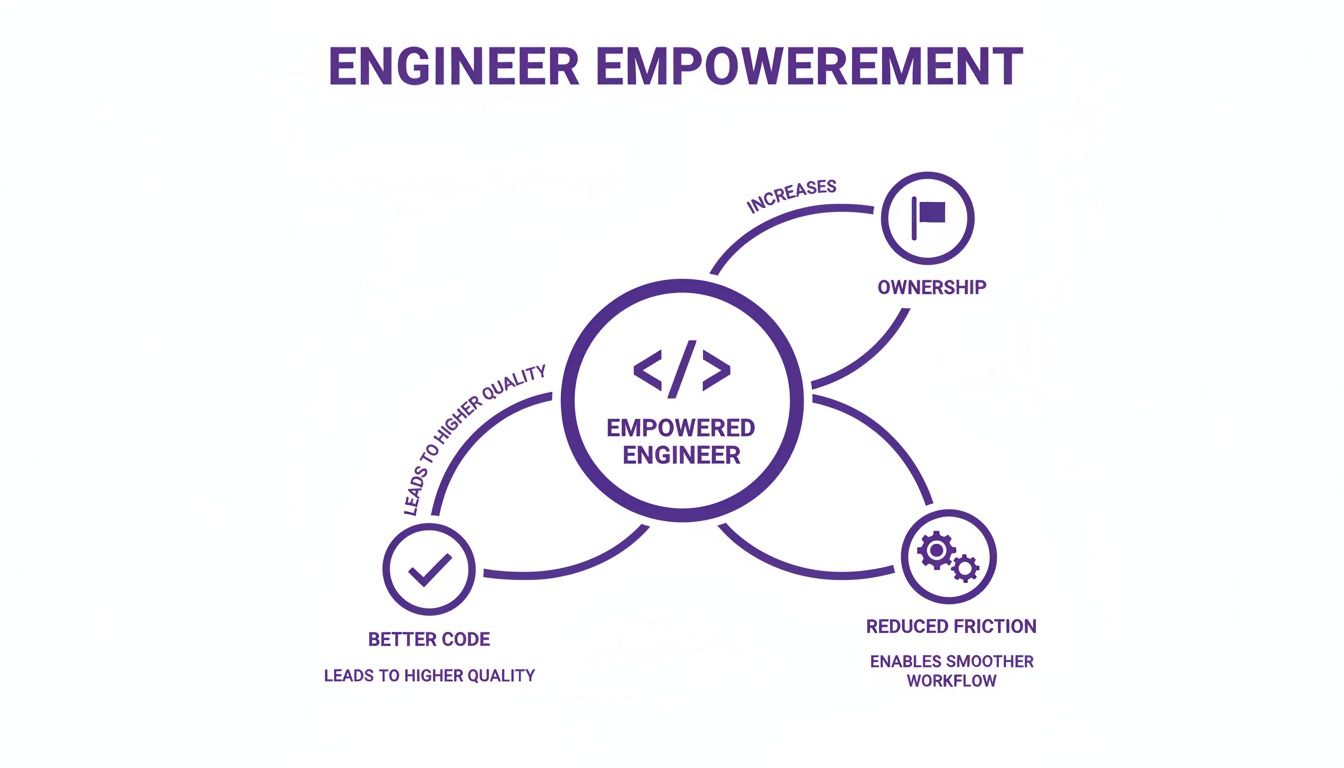
This kind of empowerment doesn't happen by accident. It's a direct result of choosing a framework that actually fits the team's work, giving them a clear path to get things done.
So, which one should you choose? Honestly, it depends entirely on your team and the type of work you do. There's no single "best" answer, only what fits best right now.
The goal isn't to follow a textbook perfectly. It's to find a system that helps your team build better software with less frustration.
For a lot of engineers, "estimation" is a dirty word. It often feels like you're being asked to predict the future, a process that usually ends with impossible deadlines and a lot of pressure. But what if we treated planning and estimation not as a management chore, but as an engineering problem?
When you do that, the whole dynamic shifts. It stops being about guessing and starts being about collaboration, discovery, and getting everyone on the same page. The point isn’t to be a psychic; it’s to build a shared understanding of what you’re up against.
This all starts by taking a huge, vague idea and breaking it down into something you can actually work with. A massive project, what we call an Epic, is like being told to "build a car." It's so big, you don't even know where to begin. So, you break it down into smaller, but still chunky, Features—things like "build the engine" or "design the chassis."
From there, you get even more granular with User Stories. This is where the magic really happens, because a user story forces you to think from the customer's point of view. Instead of a dry technical task like "implement JWT authentication," a story says, "As a user, I want to log in securely so I can access my account." That small change in perspective keeps the team focused on delivering actual value.
The next puzzle is figuring out how much effort each story will take. The old way of doing things—estimating in hours or days—is a recipe for failure. A "16-hour task" can easily become a 40-hour nightmare thanks to one unexpected bug or a poorly timed meeting.
A much better approach is using Story Points.
Story points are all about relative sizing, not time. A story point value is a blend of three things:
A simple bug fix might be a 1. A feature with a few moving parts could be a 5. Something with significant risk or a lot of unknowns could be a 13. The specific numbers don't matter as much as the team's shared agreement on what they mean. Nailing down techniques to estimate software projects accurately is one of the most important skills a development team can learn.
So, how do you actually assign these points? Many of the best teams use a technique called Planning Poker. It’s a dead-simple game that gets everyone involved and prevents the loudest person in the room from dictating the outcome.
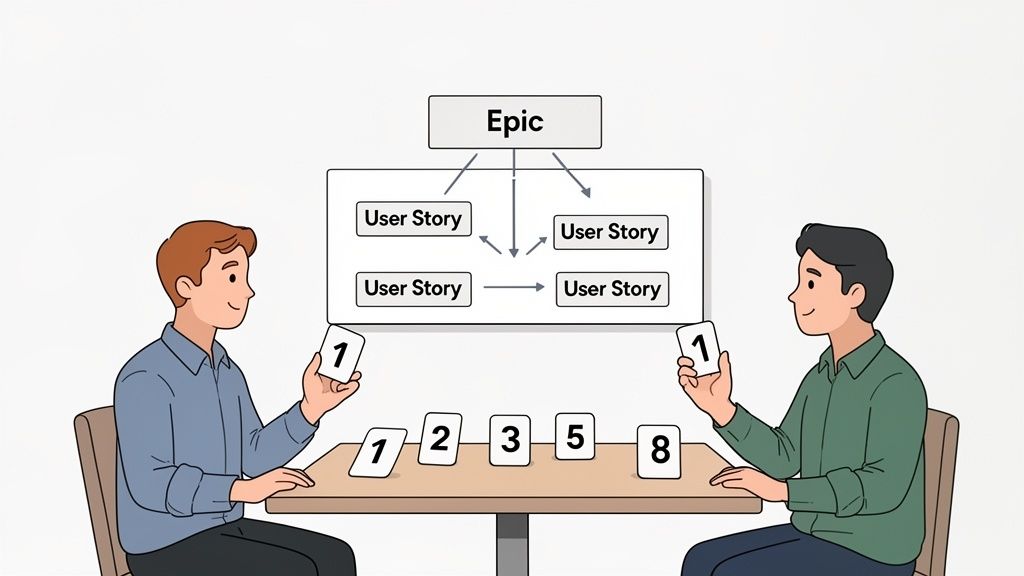
It works like this:
That discussion is the whole point. You’re not just trying to land on a number. You’re trying to surface hidden risks, share knowledge, and build a collective understanding of the work before anyone writes a single line of code.
Planning Poker isn't about finding the "right" number. It's a mechanism for surfacing different perspectives and technical insights, ensuring the final estimate is a product of collective team intelligence, not just one person's guess.
At the end of the day, this engineer-led approach to planning is what makes or breaks a project. It helps you create a believable forecast of what you can deliver, and it's a critical piece of your team's overall software development capacity planning strategy.
Great project management doesn't just happen in a Jira ticket or on a Trello board. For software teams, it's woven directly into the daily grind of coding, testing, and shipping. The best-run projects are the ones where high-level goals and methodologies connect seamlessly with the technical workflows your team uses every single day.
This is where the rubber meets the road—turning abstract plans into tangible, high-quality code.
Think of your project management framework, like Scrum or Kanban, as the blueprint for a car. It dictates the purpose, style, and overall design. Your technical workflows, such as Continuous Integration and Continuous Deployment (CI/CD), are the engine. The blueprint is pointless without a powerful engine to make it go, and it's that engine that brings Agile principles like rapid feedback and iterative progress to life.
A well-oiled CI/CD pipeline automates the entire process of building, testing, and deploying your code. Every time a developer pushes a change, this automated workflow kicks in. It catches bugs early and ensures the main codebase stays stable. This isn't just a technical convenience; it’s the very heartbeat of modern development, allowing your team to release small, incremental changes with confidence and speed.
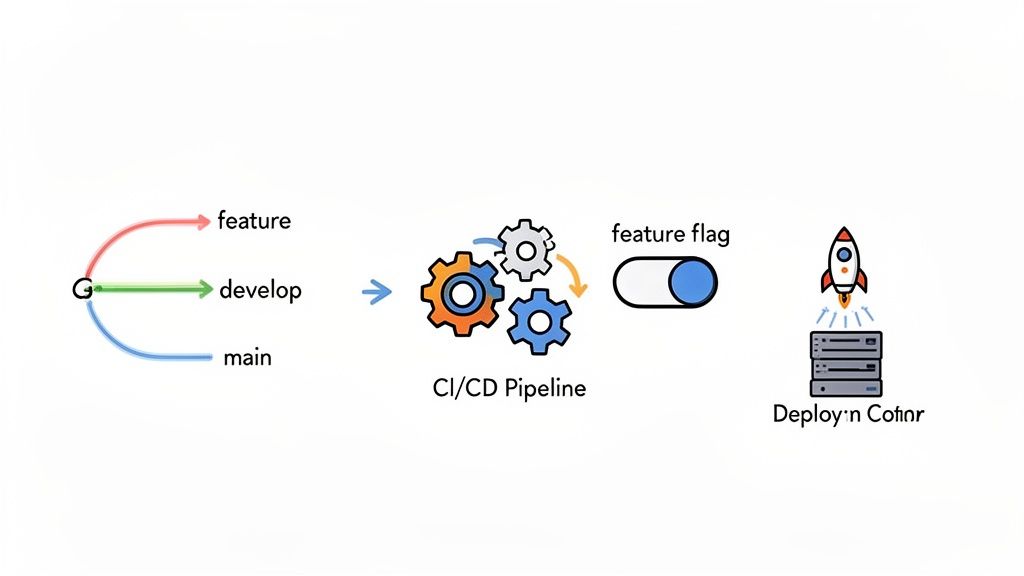
How your team handles code branches in Git is a direct reflection of your project management style. These strategies aren't just arbitrary rules picked from a blog post; they are structures designed to support a specific work cadence, whether that’s the structured rhythm of Scrum or the continuous flow of Kanban.
GitFlow for Scrum: This is a classic for a reason. GitFlow uses long-lived branches like develop and main, alongside short-lived feature, release, and hotfix branches. This structure mirrors the Scrum sprint cycle perfectly. Developers work on new features in isolated branches, merge them into develop, and when the sprint ends, a release branch is created to prep for deployment.
Trunk-Based Development for Kanban: Teams that are all-in on continuous delivery often prefer a much simpler model. With Trunk-Based Development, developers merge small, short-lived feature branches directly into the main branch (trunk) multiple times a day. This approach, paired with rock-solid automated testing and feature flags, is the essence of Kanban's continuous flow.
The whole point is to pick a branching strategy that reduces friction, not one that creates it. It has to serve the team’s ultimate goal of delivering value, whether that happens in predictable sprint-based chunks or as a constant stream of updates.
Beyond pipelines and branching, a few other technical practices are critical pieces of the project management puzzle. When you get them right, they become strategic assets for controlling releases and stamping out risk.
Release management, feature flags, and hotfixes aren't just technical afterthoughts. They are powerful levers that give engineering teams precise control over what gets shipped, to whom, and when—directly supporting the project's business objectives.
Take feature flags (or feature toggles). These are basically on/off switches in your code that let you enable or disable features without deploying a single new line of code. This is huge. It lets you safely merge unfinished work into the main branch, run A/B tests on a new design, or roll out a feature to a small group of beta testers before a full launch. It completely decouples deployment from release, giving the business incredible flexibility.
Likewise, a clear hotfix process is non-negotiable. When a critical bug pops up in production, you can't afford to wait for the next sprint. Having a well-defined workflow for creating, testing, and deploying a hotfix ensures you can respond in minutes without derailing the team's planned work.
These technical workflows are where project management becomes real and tangible for developers. It's no surprise that for most modern software teams, a deep integration of these DevOps practices is a given. In fact, research shows 78% of teams have deeply integrated DevOps to drive automation and keep their projects nimble.
Ultimately, success comes down to measuring the impact of these workflows. To learn more about which metrics really matter, you can dive into our guide on KPIs for software development.
Even the most elegant code can get completely hung up by clunky tools and bad communication. When we talk about project management for software engineers, we have to recognize that collaboration isn't just a "soft skill"—it’s a core technical competency. Building a team that really hums means you have to be intentional about designing your communication channels and picking tools that actually serve the code, not the other way around.
The real goal here is to create an environment where engineers can get into that state of deep work but still stay perfectly in sync with the team. This means making a conscious shift away from a culture of constant meetings and shoulder-taps to one built on deliberate, asynchronous communication. Studies have shown time and again that developers need long stretches of uninterrupted focus to be productive, and the right tools and practices are what guard that precious time.
Practically speaking, this means running technical meetings that have a crystal-clear agenda and a defined outcome. It means writing documentation that people actually want to read. And it means using channels like Slack or incredibly detailed pull request descriptions to solve problems without blowing up someone's entire afternoon.
Think of your project management tool as the central nervous system for your team's workflow. Picking the right one is less about a laundry list of features and more about fit. Does it slide neatly into your existing process, or does it force developers to constantly switch context? Tools like Jira, Asana, and Trello all have their fans, but you have to look at them from a developer’s point of view.
The best tools get out of the way. They reduce the administrative busywork by automating status updates and plugging directly into platforms like GitHub. They should make it easy to see the big picture without needing to sit through another status meeting. The ultimate test is simple: Does this tool save my engineers time, or does it cost them time?
To help you decide, here’s a look at some popular options based on what tends to matter most to engineering teams.
| Tool | Best For | Key Engineering Features | Pricing Model |
|---|---|---|---|
| Jira Software | Agile teams that need deep customization and powerful, granular issue tracking. | Advanced workflows, deep GitHub/Bitbucket integration, robust reporting for sprints and velocity, and customizable fields for technical details. | Freemium, then per-user monthly subscription. |
| Asana | Teams needing a balance of high-level strategic planning and day-to-day task management in a clean UI. | Timelines for roadmapping, workload management to prevent burnout, and automation rules to streamline repetitive tasks. | Freemium, with paid tiers for advanced features. |
| Trello | Small teams or projects that thrive on a simple, highly visual Kanban-style workflow. | Simple card-based system, Butler automation for basic workflows, and "Power-Ups" for adding integrations like GitHub or Slack. | Freemium, with affordable paid plans for more Power-Ups. |
| monday.com | Teams that want a highly visual and flexible platform to manage different kinds of projects side-by-side. | Customizable dashboards, multiple project views (Kanban, Gantt, timeline), and strong automation capabilities for complex workflows. | Per-seat pricing, with a minimum user requirement. |
Ultimately, the key is finding a tool that feels like a natural extension of your chosen methodology. Jira is practically synonymous with Scrum, while Trello's beautiful simplicity is a perfect match for Kanban.
While the right software is a huge help, it's the human element that truly separates a good team from a great one. The so-called "soft skills" are what turn a group of talented coders into a cohesive unit that can tackle just about anything. This is even more true in remote and hybrid setups where clear, intentional communication is the glue holding everything together.
These aren't just vague corporate buzzwords; they are practical, day-to-day skills that have a direct impact on code quality and team velocity.
At the end of the day, the most effective teams are the ones that master both sides of software development: the technical and the human. They use tools to make their work smoother and communication skills to build trust, resolve conflict, and get everyone marching toward the same goal.
You're bound to have questions as you start putting these project management ideas into practice. Let's tackle some of the most common ones that come up for software engineering teams.
The sweet spot for engineers is during estimation. Think of a Planning Poker session—that's your moment to shine. Your experience on the ground is what keeps a project plan tethered to reality. You're the one who can spot the hidden complexities or technical debt that a product manager might not see.
You don't need to sit through every planning meeting. Instead, focus your energy on asking sharp questions about user stories and giving realistic input on the effort involved. It's about providing surgical, high-impact feedback that helps set achievable deadlines from the get-go. This is what project management for software engineers looks like when it's done right.
If your Agile or Scrum ceremonies feel more like chores than tools, that's a red flag. It usually means the team is following the rules without understanding the principles. Remember, Agile is a philosophy, not a rigid instruction manual. The whole point is to bend the framework to fit your team, not force your team to fit the framework.
Your most powerful tool here is the retrospective. This is the meeting designed for fixing the process itself. Don't just complain; come with a suggestion. Propose a small experiment, like trying a one-week sprint instead of two, or changing the stand-up format to be less of a status report. Small tweaks can make a world of difference.
While velocity and burndown charts have their place, the one metric that tells the truest story is Cycle Time. This is the clock that starts the second an engineer begins work on a task and stops only when that code is live in production.
Why is it so powerful? A short cycle time is a sign of a genuinely healthy and efficient engineering machine. It tells you that your CI/CD pipeline is humming, your code reviews are snappy, and there are no hidden bottlenecks. When you focus on shrinking cycle time, you naturally end up improving everything else. And when you're ready to grow, platforms like HireDevelopers.com are great for finding vetted engineers who are already wired to work in these kinds of fast-paced, efficient environments.
You're probably in one of two situations right now. You need to hire a Scrum Master fast because delivery feels messy, or you've already interviewed a few and every candidate sounds polished, certified, and strangely interchangeable. They know the terms. They can define artifacts and ceremonies. But you still can't tell who can steady a […]

Most advice on API vs REST API starts with definitions and stops there. That's too shallow for a real project. The decision affects delivery speed, integration risk, documentation load, support burden, and even who you need to hire to keep the system stable after launch. The common mistake is treating “API” and “REST API” like […]

You're probably in one of two situations right now. You need to hire a Java developer because a core system is growing faster than your team can support, or you inherited a Java codebase and need someone who can stop the bleeding without making the architecture worse. Both situations punish vague hiring. A generic “Java […]


