What Is Snowflake Software and How It Works

Victor
Posted on 28 October 2026



Snowflake is a cloud data platform, often called the AI Data Cloud, that stores data separately from the virtual warehouses used to query it across AWS, Azure, or Google Cloud. It has grown into a major platform for organizations with complex analytics and data-engineering workloads.
The idea that Snowflake is a hosted database you turn on and forget misses the work customers still own. Snowflake manages core infrastructure, while your team configures identity and permissions, chooses warehouse capacity, shapes queries, sets data-sharing scope, and controls spending. For a medical practice, those choices affect how billing analysis and operational reporting run, and what data can be shared with a healthcare partner.
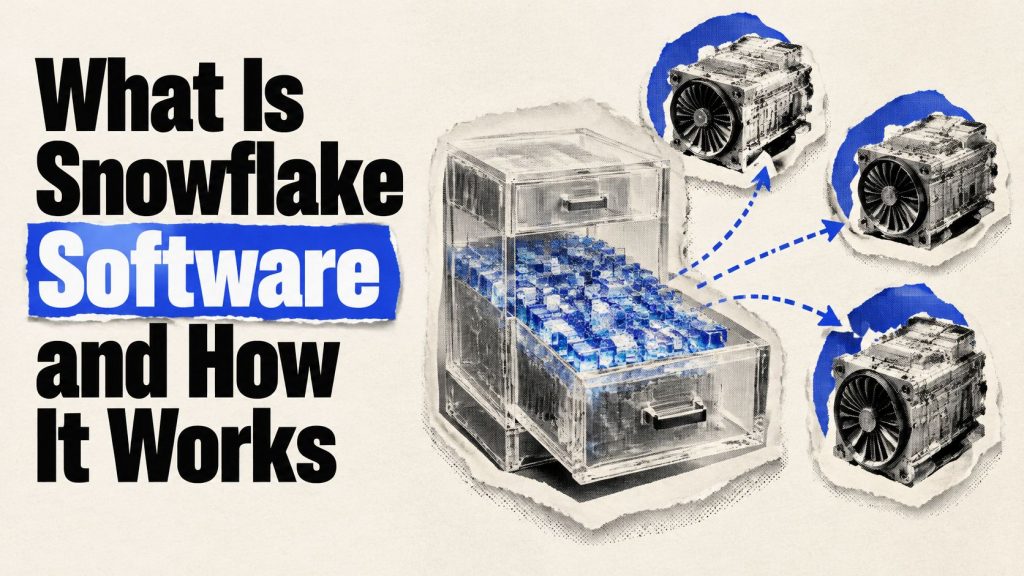
A useful analogy is a shared filing room with separate crews: storage holds the data, and each virtual warehouse supplies compute for a workload. Your team decides who can access the room, which crew handles each job, and how much compute to use. Those decisions shape both operations and cost.
The guide explains how Snowflake's storage, compute, and cloud services interact, why workloads affect the bill, and what customers must configure. It also examines common uses, sharing controls, alternatives, and how to test whether the platform fits before production.
Table of Contents
Snowflake is a cloud data platform for storing and working with data. It brings data warehousing, data-lake storage, data engineering, analytics, data science, application development, and governed data sharing into one service. Built for public-cloud infrastructure rather than adapted from an on-premises appliance, it was incorporated on July 23, 2012, by Benoît Dageville, Thierry Cruanes, and Marcin ?ukowski, according to Forbes' Snowflake company profile.
For a medical practice, appointment, billing, and patient-experience data might be brought together for operational analysis. Snowflake can store structured tables alongside semi-structured files, while virtual warehouses run the work of loading, transforming, and querying that information. Because storage and compute are separate, adding query capacity does not require making another copy of every dataset.
A shared filing room is a useful analogy. The room holds the records, while separate crews do different jobs with them. In Snowflake, storage is the room, virtual warehouses are the crews, and cloud services act as a front desk, handling metadata and coordinating requests. The organization can scale these layers independently and run Snowflake on Amazon Web Services, Microsoft Azure, or Google Cloud.
That flexibility does not make the platform a database you switch on and forget. Snowflake manages core infrastructure, but your team still configures identity, access rules, warehouse use, and workload design. Those choices affect who can see data and how much compute work runs.
Snowflake's revenue provides context for the company's growth, not a forecast of what your own deployment will cost. Total revenue was about $3.6 billion for the fiscal year ended January 31, 2025, compared with $2.8 billion in fiscal 2024 and $2.1 billion in fiscal 2023. In fiscal 2024, product revenue was $2.67 billion, up 38%, and the company reported 9,437 customers as of January 31, 2024, compared with 7,744 a year earlier. The FY2024 annual filing figures and customer count reported from the annual filing cover those fiscal-year figures and customer counts.
For your practice, the practical question is whether the reduced infrastructure administration is worth the remaining work of managing data ownership, permissions, workloads, and costs. Snowflake can provide shared access to data, but your team defines that access. Separately, organizations may turn business relationships into referral income.
Snowflake separates persistent storage, elastic compute, and cloud services. That changes how teams can organize work: dashboards, nightly loads, and exploratory queries can use separate warehouses while reading shared data. The architecture documentation explains how metadata helps Snowflake identify which stored data a query needs.

Snowflake stores structured tables and semi-structured data in a centralized repository. Tables are organized into compressed, columnar micro-partitions, each containing approximately 50–500 MB of uncompressed data. Metadata, including value ranges, lets Snowflake skip partitions that cannot contain rows relevant to a query.
Snowflake manages these physical partitions; engineers do not manually divide tables into files. Teams can still influence pruning by clustering data that is frequently filtered or joined. For example, if a practice often queries claims by service date, review those query patterns and the table layout before increasing compute.
A virtual warehouse is an independent massively parallel processing (MPP) compute cluster. Teams can assign separate warehouses to loading, dashboards, data science, and ad hoc SQL. A large backfill on the loading warehouse does not use the compute resources assigned to a separate warehouse serving a latency-sensitive dashboard.
Queries on the same warehouse share its available compute, so a resource-intensive batch job can slow interactive work there. Separate warehouses isolate workloads, but create more capacity settings for the team to manage. Multi-cluster warehouses can add clusters as concurrency rises and release them as demand falls.
Before resizing, check the query profile and partition-pruning behavior. A larger warehouse may leave compute resources underused if the query has little work to distribute. Better pruning or workload separation may address the bottleneck more directly, though the right choice depends on the query.
Cloud services handle authentication, metadata, query optimization, transaction management, and sharing controls. Snowflake operates this layer, so customers do not size it like a virtual warehouse. Zero-copy cloning, for example, can create a development or test copy without an immediate full second storage copy. Changes that diverge from the original add storage needs over time.
| Layer | What it holds | Who changes capacity | How it is billed |
|---|---|---|---|
| Storage | Central tables and semi-structured files in compressed micro-partitions | Grows with data loaded; customers don't buy disks | Storage is billed separately from compute |
| Compute | Virtual warehouses running queries, loads, and transforms | Customer chooses size, multi-cluster policy, and auto-suspend | Credits accrue while a warehouse runs |
| Cloud services | Optimizer, metadata, authentication, transactions, and sharing control plane | Snowflake operates it | Included up to a threshold, with heavy use billed |
The platform removes server administration, not operating decisions. Your team still configures identity and access, chooses warehouse sizes and scaling rules, shapes queries, sets sharing scope, and monitors the bill. For teams making schema and table-layout choices, these database design best practices can help connect query patterns to deliberate design. A useful whiteboard sketch shows shared storage, named warehouses for each workload, and a clear rule for who can resize them.
Snowflake removes server administration, not cost management. Its consumption pricing means the bill follows usage, shaped by how workloads are designed and operated. The main meters are storage for retained data and compute credits for warehouse runtime. Snowflake's platform overview and performance information describes consumption pricing and vendor-reported performance changes.
Compute spend varies with warehouse size, active time, concurrency, scheduled jobs, retries, query efficiency, and whether warehouses keep running without auto-suspend. Storage is a separate part of the bill. Retained history, unused files, and clones that have diverged can increase storage over time, so teams need to review both meters.
Snowflake reports workload-dependent performance improvements from newer runtime and indexing features. Such improvements may help a workload that benefits from them, but vendor benchmarks do not predict the speed or cost of a particular query. Query shape, warehouse settings, and runtime all affect the result.
| Driver | Why spend rises | Control to set |
|---|---|---|
| Warehouse size | Larger sizes spend credits faster per second | Start small; scale after a query profile shows a scan-heavy query |
| Runtime and idle time | Credits accrue while the warehouse is resumed | Set auto-suspend after a short idle window for interactive warehouses |
| Concurrency | Multi-cluster mode can start additional clusters | Cap maximum clusters and isolate batch work from dashboards |
| Query shape | Scans, retries, and Cartesian joins add runtime | Use selective filters and cluster frequently filtered columns where appropriate |
| Always-on jobs | Scheduled tasks can keep compute warm | Set resource monitors to notify or suspend at a credit threshold |
| Storage growth | Retained history, files, and diverged clones accumulate | Set retention policies and review unused databases |
Controls need owners as well as configuration. A resource monitor can trigger an action at a credit threshold, while auto-suspend limits runtime for short-lived workloads. Separate batch work from interactive queries before increasing warehouse size. Newer automatic optimization may improve efficiency, but it can also make future consumption harder for non-specialists to predict. Compare forecasts with actual usage, and assign someone to investigate differences.
For example, if a dashboard warehouse is left running between reporting periods, its idle time still affects compute usage. Auto-suspend addresses that runtime; a larger warehouse would not.
Operational test: If no one can identify which warehouse used yesterday's credits, the account isn't ready for production growth.
Snowflake Secure Data Sharing lets a provider expose selected database objects through the platform's services and metadata layers without copying the underlying data into the consumer's account. Shared objects are read-only. The provider continues paying for storage, while the consumer pays for the virtual-warehouse compute used to query the data, as explained in Snowflake's governance and sharing guidance.
For example, a medical practice could provide a health system or billing partner with access to a curated view rather than exporting a fresh file every night. The consumer can query that shared view using its own warehouse, while the practice controls which objects are visible. This can reduce duplicated data and stale extracts, but it doesn't remove the need to decide what the partner should see.
Before a share goes live, establish controls such as:
Snowgrid extends collaboration across supported AWS, Microsoft Azure, and Google Cloud regions with consistent controls. Snowflake Marketplace applies a related model to datasets and applications, letting a consumer work with a listing inside its account rather than relying on a separate file-transfer integration. In either case, sharing does not make the provider's governance decisions on its behalf.
A data clean room is different from giving an external contractor a role on a full patient table. The provider defines which analyses the other party may run, and the consumer receives approved insights rather than unrestricted access to underlying data. For healthcare organizations, that can support carefully scoped population-health or payer analysis, but it doesn't replace legal review, minimum-necessary access decisions, or a required agreement.
Snowflake's terms require a Business Associate Agreement (BAA) before a customer processes HIPAA data in the service, as stated in its terms of service. A BAA doesn't make an implementation HIPAA-compliant by itself. Your practice still needs appropriate roles, safeguards, audit procedures, downstream agreements, and qualified compliance or legal review for its actual workflow.
The design rule is simple: authorization and computation stay separate from copying the bytes.
Teams use Snowflake for several kinds of data work, but the label “data platform” can obscure whether it fits a specific job. Describe the workload first, then choose the tools and ownership model around it.

The operating model can look different by organization size. A startup with one analytics engineer might keep raw files and modeled tables in one account and let a small warehouse suspend outside working hours. A mid-market company might give marketing, finance, and data science separate warehouses so a large data backfill doesn't stall the Monday reporting pack. A regulated enterprise might use security features suited to its requirements, private networking, and masked views for a billing partner.
Snowflake shouldn't be the first system for every team. A transactional application that depends on frequent row-by-row changes may need an operational database instead. A team without anyone to own roles, warehouses, and query performance may struggle to manage a consumption platform. A group focused exclusively on model training in notebooks may get more value from a different environment. Label each proposed use as a warehouse, pipeline, share, or application before committing to a platform design.
| Platform | Strongest fit | How compute is bought | Pick it instead when |
|---|---|---|---|
| Snowflake | Multi-cloud SQL analytics and governed sharing | Credits per running warehouse, plus storage | You need a consistent platform on AWS, Azure, and Google Cloud, or regularly use data shares |
| Amazon Redshift | AWS-centric warehousing | Provisioned nodes or serverless RPUs | Your data, identity, and surrounding services already sit in AWS |
| Google BigQuery | Serverless analytics on Google Cloud | On-demand scanned data or slot capacity | You want Google-native SQL without managing virtual warehouses |
| Databricks | Lakehouse engineering and machine learning | Databricks units on clusters or serverless jobs | Spark, notebooks, and model training dominate over BI SQL |
All four platforms can support analytical workloads. The practical differences are the surrounding cloud environment, how your team likes to operate compute, and whether the work centers on SQL reporting, data engineering, or machine learning. A team already standardized on AWS may prefer to keep an ordinary warehouse workload in Redshift rather than add a cross-cloud platform without a clear reason.
Snowflake is a strong fit when consistency across cloud providers or governed data sharing is central to the project. BigQuery can suit a team that wants Google-native analytics and is comfortable with on-demand scan behavior or slot capacity. Databricks fits engineering teams whose daily work relies on Spark, notebooks, and model pipelines, though that environment involves its own cluster and job design.
Don't assume a platform is universally cheaper. Snowflake credits, BigQuery scanned data or slots, Redshift capacity, and Databricks units reflect different operating models. Compare them against representative query shapes, concurrency, and job schedules rather than a single price label.
The situational verdict: stay with the cloud you already operate when the work is ordinary SQL and the team is small; choose Snowflake when cross-cloud consistency or governed sharing is the main requirement; choose Databricks when data engineering and ML work dominate. None is a universal winner.
Snowflake manages core platform infrastructure, encryption within the service, and its multi-cluster engine. Your team still configures identity, role-based access, least privilege, network policies, masking, row-access rules, monitoring, and incident preparation. A misconfigured role remains a customer-side risk even when the platform itself is securely operated. Snowflake's security and governance guidance describes customer responsibilities for access and governance.
Assign ownership before a pilot: the infrastructure owner handles the cloud account and private networking; procurement tracks account editions; data engineering owns databases and warehouses; analytics owns pipelines; product engineering owns applications; and security owns user identities and access policy.
A small team can start with existing developers if the work is modest SQL and there's a clear owner for permissions and warehouse settings. Add a data engineer when the workload involves multiple shares, many warehouses, complex pipelines, or broader compliance needs. If the gap is staffing rather than platform choice, hiring data engineers can help you assess whether Snowflake experience belongs in the role profile.
Snowflake software is an elastic analytical platform, not a finished data program. Your next useful move is a bounded pilot with named owners for warehouses, roles, and spend.
Snowflake brings shared data storage, independently scalable compute, and platform services into one cloud data platform. That can simplify infrastructure and support distinct workloads, but your team still owns access, query design, workload separation, data sharing, and cost controls.
Test the platform with representative data and real queries before expanding. Give someone clear responsibility for warehouse settings and roles, and make sure you can explain what drove the bill before usage grows.
HireDevelopers.com helps companies shortlist vetted data and analytics engineers, including candidates with Snowflake experience, for project or ongoing work. If your pilot shows you need an owner for pipelines, permissions, or warehouse operations, visit HireDevelopers.com to explore your staffing options.

You’re probably here because US hiring has turned into a bad joke with a real invoice attached. Salaries keep climbing, recruiters keep spamming, and every time you finally find someone solid, another company tries to poach them before their laptop sticker pack arrives. That’s why smart teams are looking at tech in mexico. Not as...

A founder's guide on how to hire remote developer talent. Learn to source, vet, and onboard elite developers who get the job done right.


So, you’re looking to hire a Django developer. Let's get straight to the point: what's the real cost, not just in dollars, but in your time and sanity? The short answer? It depends entirely on how you hire. A full-time US-based developer can easily command $120,000+ a year. Or, you could tap into pre-vetted talent...


