Trunk Based Development vs Gitflow: A Practical 2026 Guide

Victor
Posted on 13 October 2026
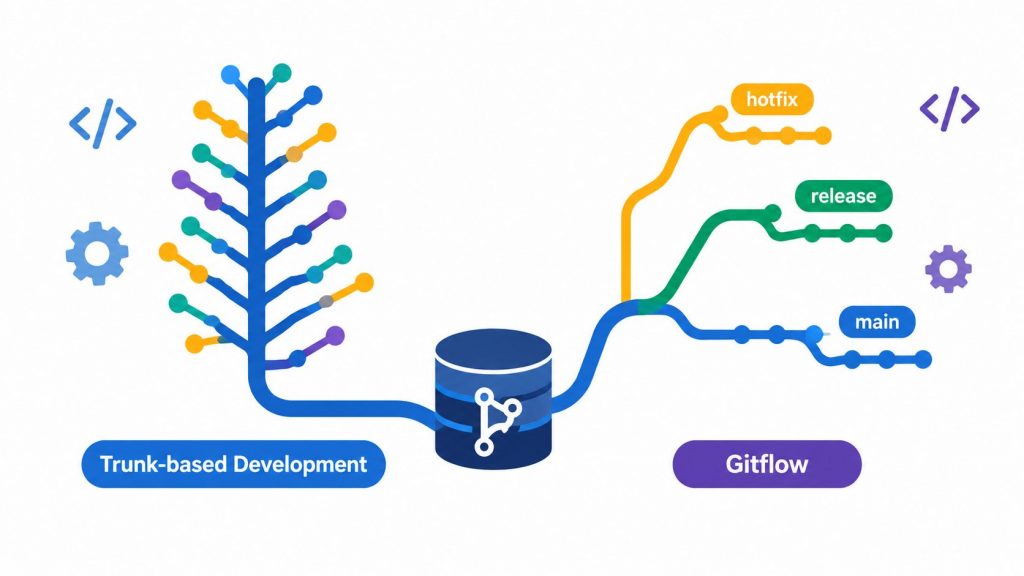



You do not choose trunk based development vs Gitflow by asking which one sounds more modern. You choose by asking how your team ships, how often you release, how much change you can safely absorb, and how much release risk you can carry between commits and production. For teams that ship continuously, trunk-based development is the better default because it keeps feedback short and avoids branch drift. Gitflow still earns its place when you need scheduled releases, multiple supported versions, or a built-in stabilization lane for production fixes.
The popular advice gets the fork in the road wrong. It treats branch structure like a philosophy, when it's really an operating choice. A team with reliable tests, tight reviews, and feature-flag discipline can keep the trunk clean and ship small changes safely. A team with regulated releases, versioned software, or slower coordination may be safer with Gitflow's explicit release paths. The right answer is usually the one that matches your current maturity, not your aspirational one.
| Dimension | Trunk based development | Gitflow |
|---|---|---|
| Branch shape | One shared trunk with short-lived branches | Long-lived main and develop, plus feature, release, and hotfix branches |
| Release style | Continuous, small batches | Scheduled, versioned releases |
| Best fit | Fast feedback and frequent integration | Explicit stabilization and parallel maintenance |
| Main risk | Weak tests and flag debt | Merge overhead and branch drift |
Table of Contents
Trunk based development means the team works against one shared trunk, usually main, and merges small changes back into it frequently, even several times a day. Gitflow means the team keeps separate long-lived branches for production and integration, usually main and develop, then uses temporary feature, release, and hotfix branches around them. Those are not just diagram choices, they shape how often code meets other code, how quickly defects surface, and how releases are assembled.
In practice, trunk-based development is built around small batches, automated checks, and unfinished work hidden behind feature flags. That keeps the trunk close to releasable at all times, so the branch structure supports continuous delivery instead of waiting for a formal release train. Gitflow is built for explicit stabilization periods, where release preparation happens in a dedicated branch before production is tagged. That makes sense when you need to inspect, freeze, and approve what's going out.
Practical rule: if your team can't explain how unfinished work stays safe before it merges, your branching model is the wrong one for your current maturity.
A manager scanning this page should think in operating conditions, not ideology. If you can merge small changes safely, trunk-based development is usually the cleaner path. If you need to support versioned software or hold a release line steady while new work continues elsewhere, Gitflow gives you that structure without improvising around it. For a good companion overview on coordinating development conventions, optimize your software development workflow is a useful external reference.

A trunk-based repo usually has one default branch and short-lived task branches. Developers branch, commit, open a pull request, get review, merge, and delete the branch after merge. GitHub's documented workflow follows exactly that pattern, and its protected-branch controls let you require reviews, status checks, resolved conversations, signed commits, linear history, deployment success, or a merge queue before changes land on the protected branch. GitHub's branch protection documentation shows that short-lived branches do not have to mean loose controls.
The important part is that unfinished work doesn't linger. A team can keep a short-lived branch workflow and still insist on review and automated checks before the trunk changes. That's the practical version of trunk-based development, not direct pushes and wishful thinking. The trunk stays the center of gravity, and the branch lifecycle stays short enough that merge pain doesn't build up.
Gitflow starts with a different assumption. Work lands in develop, release branches are cut when a version needs stabilization, and hotfix/* branches handle urgent production fixes off main. That gives release managers a place to freeze scope, test the package, and merge the result back into the long-lived branches when it's ready. It's slower, but it's explicit, and that explicitness matters when multiple versions are in play.
GitHub's protected-branch controls can support either model. The branch layout changes, but the quality gates don't have to.
For a code-review process that works with either workflow, this practical code review guide is worth keeping handy. It fits best when your team wants to keep review discipline tight without turning every merge into ceremony.

| Dimension | Trunk based development | Gitflow |
|---|---|---|
| Branch longevity | Short-lived, low drift | Longer-lived, more drift |
| Merge conflict size | Usually smaller | Usually larger |
| Release cadence | Continuous or very frequent | Scheduled and deliberate |
| Coordination cost | Lower once discipline is in place | Higher, but more structured |
| Automated test demand | High | Moderate to high |
| Rollback path | Revert or flag flip | Back out or patch a versioned release |
| Audit readiness | Good when controls are enforced | Strong when release traceability matters |
The advantage of trunk-based development is not speed for its own sake. It reduces the distance between implementation and integration, so problems show up while the change is still small. That works especially well when automated tests are reliable and the team can hide incomplete behavior behind flags. If either of those is weak, the model loses a lot of its safety margin.
Gitflow earns its keep where release boundaries matter more than merge cadence. It gives you a natural place to stabilize, test, and package a version before it reaches production. That structure is useful when you can't treat every commit as a near-term release candidate, which is common in versioned products and environments with formal approval steps.
The trade-off is coordination. Gitflow asks the team to manage more branches for longer, and that means more merging, more backporting, and more places for drift to hide. Trunk-based development asks the team to keep changes small and the trunk healthy, which is simpler once the engineering habits are there but unforgiving when they aren't.
Operational reality: the branch model doesn't remove release risk, it redistributes it. Trunk-based pushes risk into testing and flags. Gitflow pushes risk into branch management and stabilization.
Team size matters, but it is not the first question. Release cadence and product shape decide far more than headcount does.
Small teams often fit trunk based development well because the coordination cost stays low and feedback arrives quickly. Early-stage product teams usually benefit for the same reason. If the same people write, review, and ship the code, extra branch structure adds ceremony without adding much safety. A ten-person team can still run trunk based development effectively, provided reviews are disciplined, CI is reliable, and feature flags are handled with care. continuous integration practices matter because the model depends on catching breakage while the change is still easy to fix.
Larger teams can also use trunk based development, but only when integration habits are strong enough to absorb frequent merges. Without that discipline, the trunk gets noisy and small regressions linger longer than they should. In practice, the question is whether the team can keep changes small, keep the mainline healthy, and fix failures fast.
Gitflow earns its place when the product ships in controlled versions instead of one continuously moving release line. That is common in enterprise software, embedded systems, customer-hosted deployments, and mobile release trains. If customers expect scheduled upgrades, formal approvals, or maintenance work on older versions, Gitflow matches the release process better than a single trunk that ships every change as soon as it is merged.
A hybrid is often the least awkward answer. Many teams keep trunk based development for normal work, then cut release branches only when a version needs extra stabilization or long-term support. That keeps the daily path simple while giving versioned releases a separate lane.
| Product shape | Better default |
|---|---|
| SaaS with continuous delivery | Trunk based development |
| Versioned enterprise software | Gitflow |
| Mobile app with release trains | Often Gitflow, sometimes hybrid |
| Small web team shipping weekly or daily | Trunk based development |
Hiring developers who already know the chosen workflow is easier when the whole team uses it consistently. The process still has to fit the product and release shape first.
The safer model is usually the one that matches your engineering maturity, not your team size. That's the part most comparisons skip. A team with infrequent releases, shaky test automation, and slow incident response often needs Gitflow's release branch as a stabilization buffer. A team with strong observability, reliable rollback, and disciplined feature flags can usually move faster and more safely on trunk-based development.
Ask five questions and answer them truthfully.
The key insight is that feature flags are not free. They reduce branch drift, but they also create configuration states, testing combinations, permissions issues, and cleanup debt. That debt matters just as much as merge conflict debt. A team that doesn't govern flags well may think it has embraced modern delivery, when it's really just moved complexity from branches into runtime configuration.
Rule of thumb: if you can't describe your rollback path, your flag cleanup process, and your supported-version policy in one meeting, you're not choosing a branching model yet. You're choosing where the mess will live.
GitHub can enforce either workflow without forcing direct pushes or custom tooling. The protected-branch settings let you require pull-request reviews, status checks, signed commits, linear history, deployment success, or a merge queue. If you require linear history, merges have to use squash or rebase, not merge commits. That works well for trunk-based development, because you can keep short-lived branches while still requiring review and checks before anything reaches the trunk.
Two protections deserve special attention because they're disabled by default when branch protection is created, who may push and branch deletion. If you don't set those deliberately, your nice policy can become looser than you think. For Gitflow, that matters on main and develop. For trunk-based development, it matters on the trunk itself and on any release branch you keep around.
For teams that want a practical policy reference, these Git workflow best practices are a useful companion. The point isn't to add ceremony. It's to make the chosen workflow enforceable so your repo doesn't drift into exceptions by accident.
The biggest trunk-based mistake is merging without reliable tests or feature flags. That usually turns the trunk into a live incident stream, and the team starts blaming the workflow instead of the missing controls. Trunk-based development is not a license to move unfinished work into production visibility without a plan.
The biggest Gitflow mistake is treating release branches like free QA. A release branch is a stabilization room, not a substitute for disciplined review or pre-merge testing. If the quality work happens after the branch is cut, the team has moved the pain later in the cycle.
Merge conflict pain is easy to underestimate on long-lived branches. The longer a branch lives, the more expensive the final merge tends to feel, especially when several people have been changing adjacent areas of the codebase. That is why branch lifespan matters even more than branch naming.
The hidden organizational mistake is declaring a winner before fixing ownership of production toggles, observability, and incident response across time zones. Branch structure can't compensate for weak operational discipline. It only exposes the gaps faster.
Use trunk based development when you deploy often, can merge small changes safely, run reliable automated tests, and can roll back quickly. Use Gitflow when you release on a schedule, support multiple versions, or need explicit stabilization around versioned deliveries. Use a hybrid when trunk works for day-to-day work but support lines or release windows need their own branch discipline.
The takeaway: branching strategy is not an identity choice, it's a release-risk choice. Trunk-based development is usually the cleaner default because it keeps feedback fast and integration small. Gitflow still makes sense where versioned software, release windows, or multiple supported versions justify its extra structure.
The next move is practical, not theoretical. Audit your flag debt, review your branch protections, and write down how you roll back production changes. If your product is mostly continuous, keep trunk as the default and carve out release branches only where they're needed.

Let's cut to the chase. You see the tech layoff headlines and start to wonder if the software engineering gold rush is finally over. The short answer? Not even close. Demand hasn't disappeared—it’s just gotten a lot more specific and, frankly, a lot harder to navigate. Turns out there’s more than one way to hire...

Discover the top 12 software development contract sample strategies and tips. Complete guide with actionable insights.


Teams often don't arrive at Kubernetes because they love YAML. They arrive because the old deployment process turned into a ritual of crossed fingers, late-night Slack messages, and someone muttering “it worked on staging” like that's legally admissible evidence. You've probably lived some version of it. A shell script no one wants to touch. A...


